
Android Truecaller SDK Journey

Shubhral Kumar
Jan 9, 20269 min read
User onboarding is a critical first step in delivering a seamless app experience, and the login process plays a vital role in it. A seamless login experience can significantly boost an app’s user engagement and retention. However, traditional methods like manual sign-ups or SMS-based OTPs are often cumbersome, leading to user drop-offs. The Android ecosystem provides various login SDKs, each offering unique features to streamline authentication while ensuring security and user convenience. From social logins to passwordless authentication, choosing the right SDK can greatly enhance user engagement. In this blog, we’ll explore the evolution of different Android SDKs created at Truecaller over the years that have simplified the onboarding process for thousands of apps and millions of users.
Introduction
User onboarding is a critical first step in delivering a seamless app experience, and the login process plays a vital role in it. A seamless login experience can significantly boost an app’s user engagement and retention. However, traditional methods like manual sign-ups or SMS-based OTPs are often cumbersome, leading to user drop-offs. The Android ecosystem provides various login SDKs, each offering unique features to streamline authentication while ensuring security and user convenience. From social logins to passwordless authentication, choosing the right SDK can greatly enhance user engagement. In this blog, we’ll explore the evolution of different Android SDKs created at Truecaller over the years that have simplified the onboarding process for thousands of apps and millions of users.
1-tap SDK
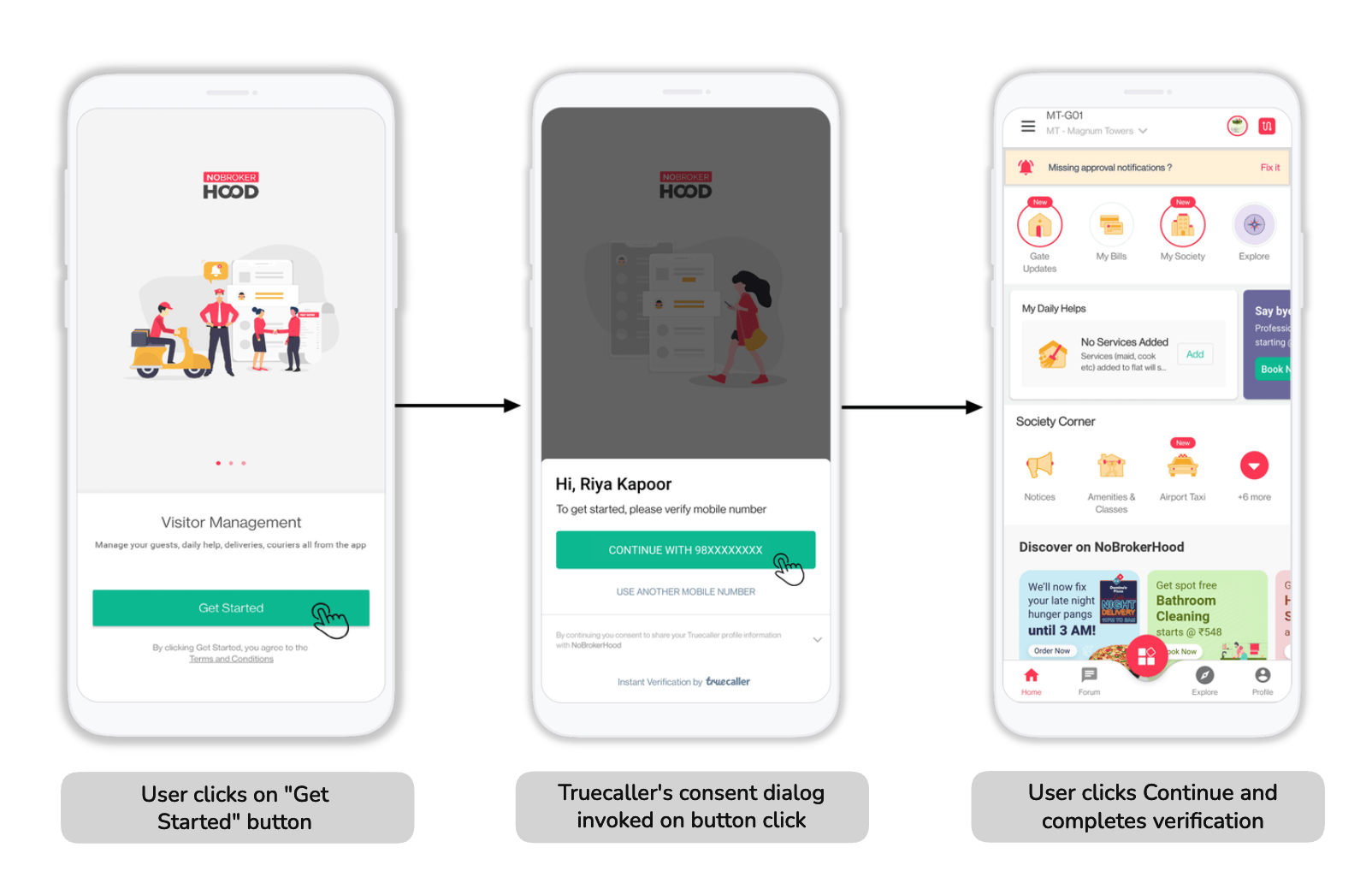
Example of Invoking user signup/login/verification via Truecaller 1-tap SDK in NoBroker app - India’s leading realty app
With more than 450+ million users globally, Truecaller is the largest mobile number identity platform. This means that these millions of users who have the Truecaller app on their mobile devices have created their profiles with Truecaller by verifying their mobile numbers and associating their identities.
Keeping this scale in mind, it made so much sense for Truecaller to offer a mobile number verification service that any Android app can consume to quickly onboard users without the need for any SMS-based OTP, and at the same time help them capture their mapped user profile.
That’s how we got the idea for the first version of Truecaller SDK, a 1-tap SDK through which we intended to solve different pain points for the partner apps as well as our users while taking advantage of the scale of Truecaller. With the launch of Truecaller 1-tap SDK, we provided a lot of advantages:
- Increased successful verification/signup/login attempts with verified phone numbers
- Reduced user drop-offs and app abandonments with frictionless, 1-tap, and instant verification with fewer steps/screens.
- Simple, zero-effort flow where users don’t even need to type the mobile number manually, hence avoiding any unwanted typos.
- Reduced user acquisition costs resulting from multiple/failed/delayed SMS OTP.
- Auto-filling the user registration form by capturing the mapped user profile (first name, last name, phone number, etc.) post the user consent
How it works
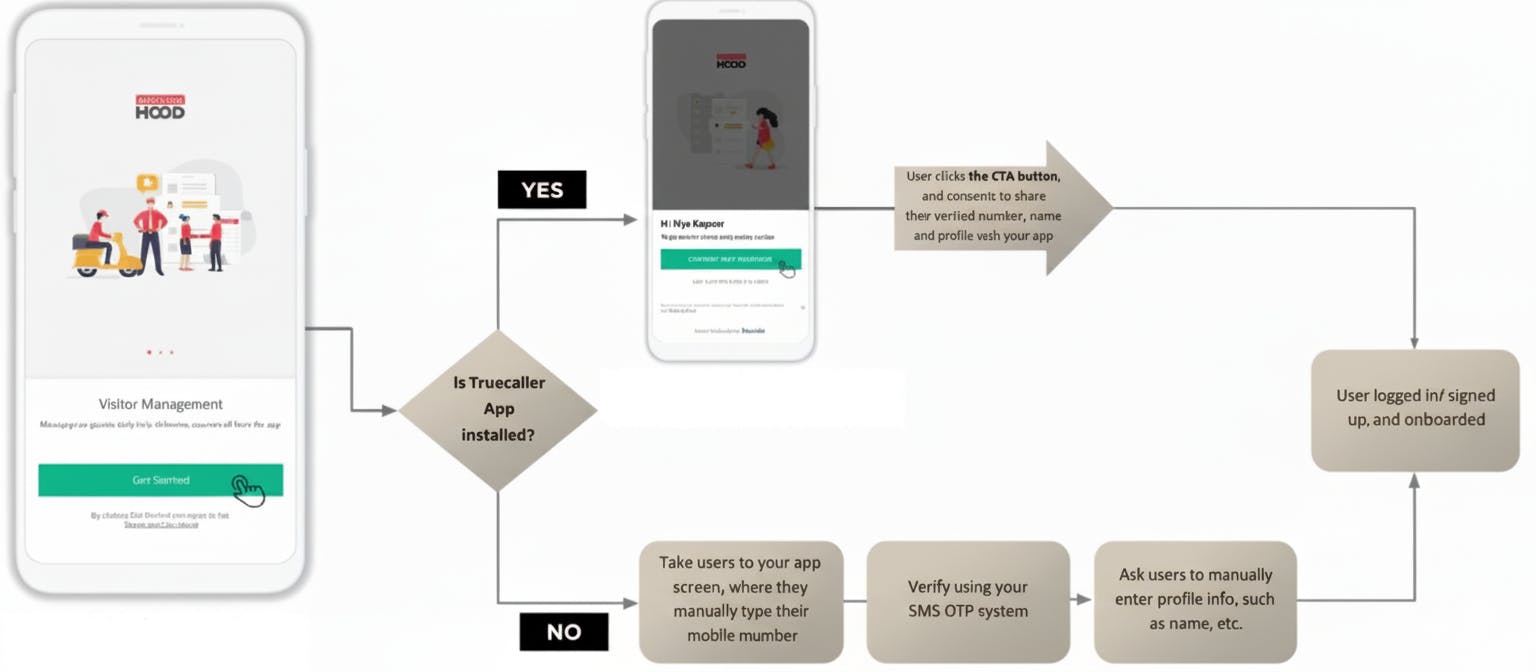
Truecaller SDK 1-tap flow
Full-Stack SDK
1-tap SDK solved the majority of the problem since the overlap between the Truecaller users and the users onboarding on the partner app was quite good. However, there was still a gap that we wanted to address, for example, how do we solve it for users who:
- Don’t have a Truecaller account
- Have a Truecaller account, but don’t have the Truecaller app on their device
- Just want to use an alternate mobile number.
So, building on top of the 1-tap SDK, we wanted to provide a 1-stop solution to verify both Truecaller and non-Truecaller users. For verifying non-Truecaller users or users who wanted to verify some alternate number, we wanted to provide a manual verification flow where partner apps can utilize our infrastructure to trigger either a drop call or an OTP-based manual verification flow. Enter our Full-Stack SDK, which solves this problem for partners who earlier had to fall back to an alternate mechanism to manually verify the users. With the launch of our Full-Stack SDK, partners could just integrate 1 SDK, which helps them verify all kinds of users irrespective of whether they have a Truecaller account or not.
How it works
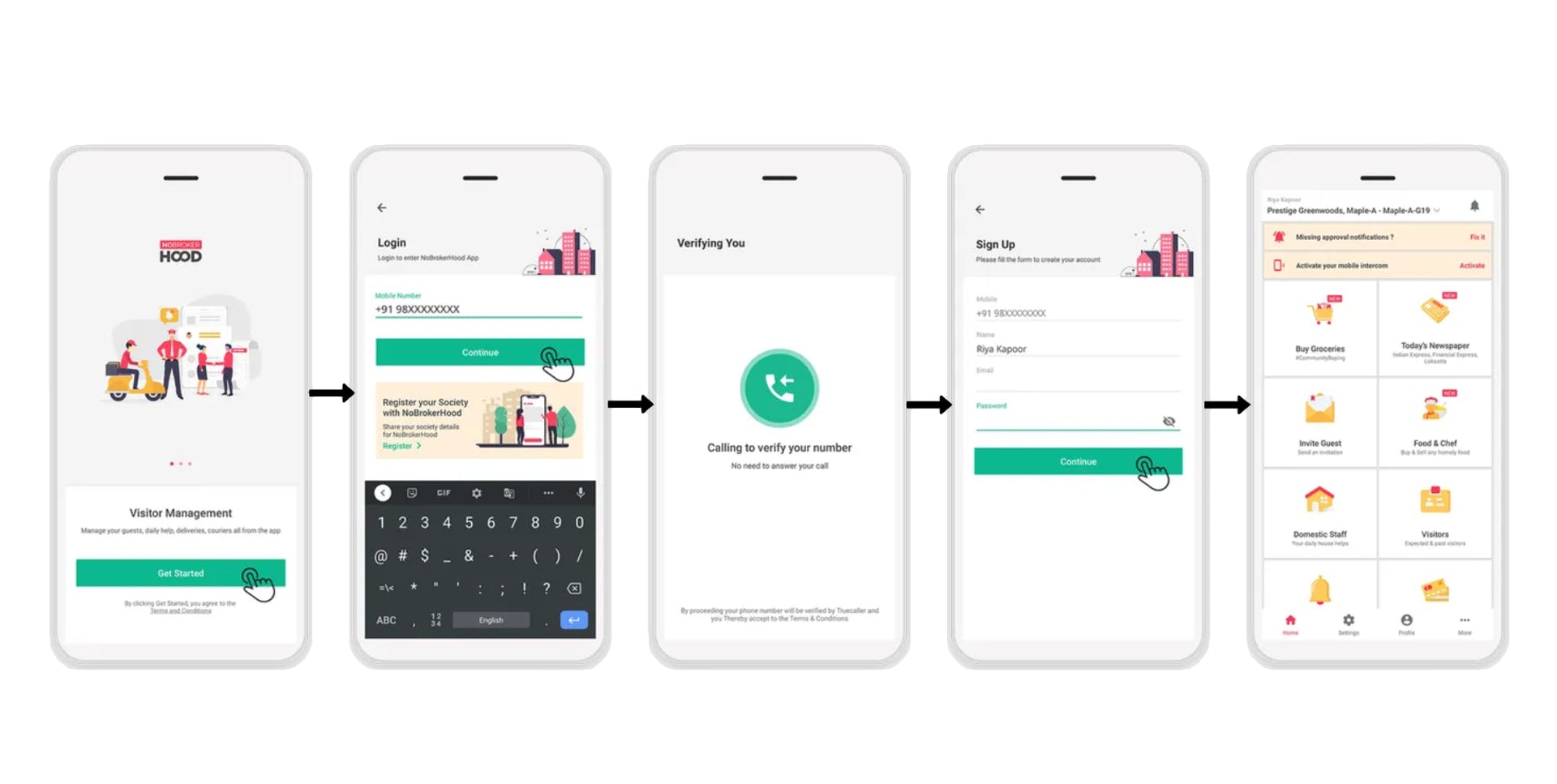
Scenario 1 Example: Drop call verification for a new user via Truecaller Full-Stack SDK
Scenario 1
Applicable if either of these conditions is true:
- The user doesn’t have a Truecaller app installed on the device.
- The user has a Truecaller app, but is not logged in or doesn’t have a valid account state.
- The user has a Truecaller app but skips/rejects the 1-tap flow consent screen to login via some other number.
- The user has never done a manual verification on this partner app before for the given phone number on the same device.
In the above scenario, a fresh manual verification in the form of a drop call or an IM-OTP (OTP via Instant Message) is triggered via the SDK to help the partner app verify the user’s phone number using Truecaller’s infrastructure, post which we ask the partner app to share the first name and last name so that we can store this information at our end which can be later used by the partner as mentioned below in Scenario 2.
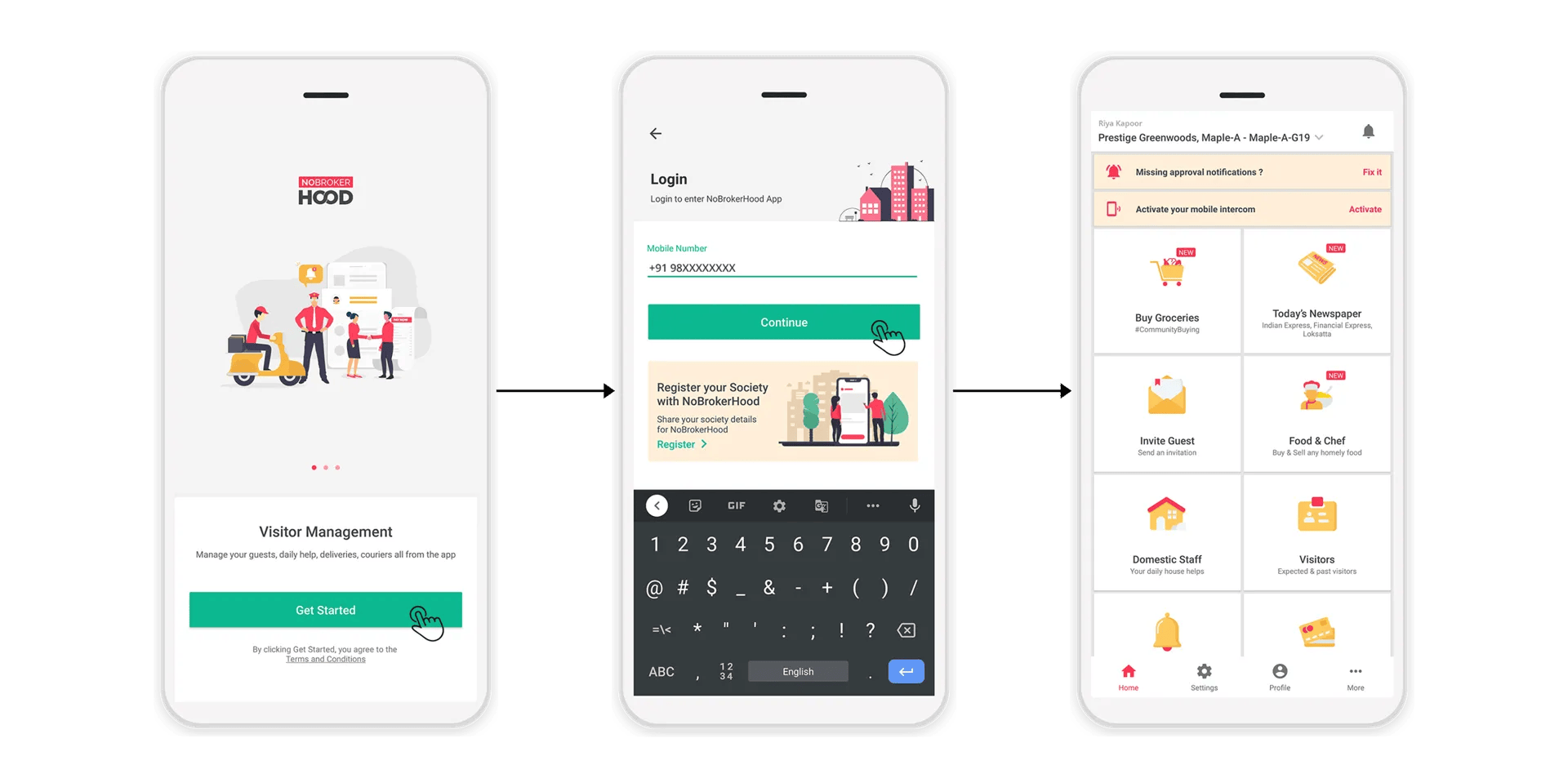
Scenario 2 Example: Existing user verification via Truecaller Full-Stack SDK
Scenario 2
Applicable if either of the Scenario 1 conditions is true, except the last one, which can be replaced with the following scenario: The user has already done a successful manual verification on this partner app before for the given phone number on the same device.
In the above scenario, a fresh manual verification is not required, as a successful verification was already completed for the given combination of device, phone number, and partner app. Since we already have the name details stored, as mentioned in Scenario 1, we will directly share them with the partner.
OAuth SDK
While the 1-tap SDK was a game-changer for user experience, it still had limitations. As the digital landscape advanced, so did the requirements for login solutions. Concerns around user control, data privacy, security, and cross-platform support necessitated a more transparent and standardized approach. Additionally, developers sought a login mechanism that was more versatile and could integrate seamlessly with existing authentication flows.
To address these needs, Truecaller launched its OAuth SDK. This new iteration leveraged the OAuth 2.0 protocol, a widely adopted standard for secure and scalable authentication that focuses on client developer simplicity while providing specific authorization flows for web applications, desktop applications, mobile phones, and living room devices. By shifting to OAuth, Truecaller offered developers and users a more robust, flexible, and compliant solution.
Key Features of the OAuth SDK
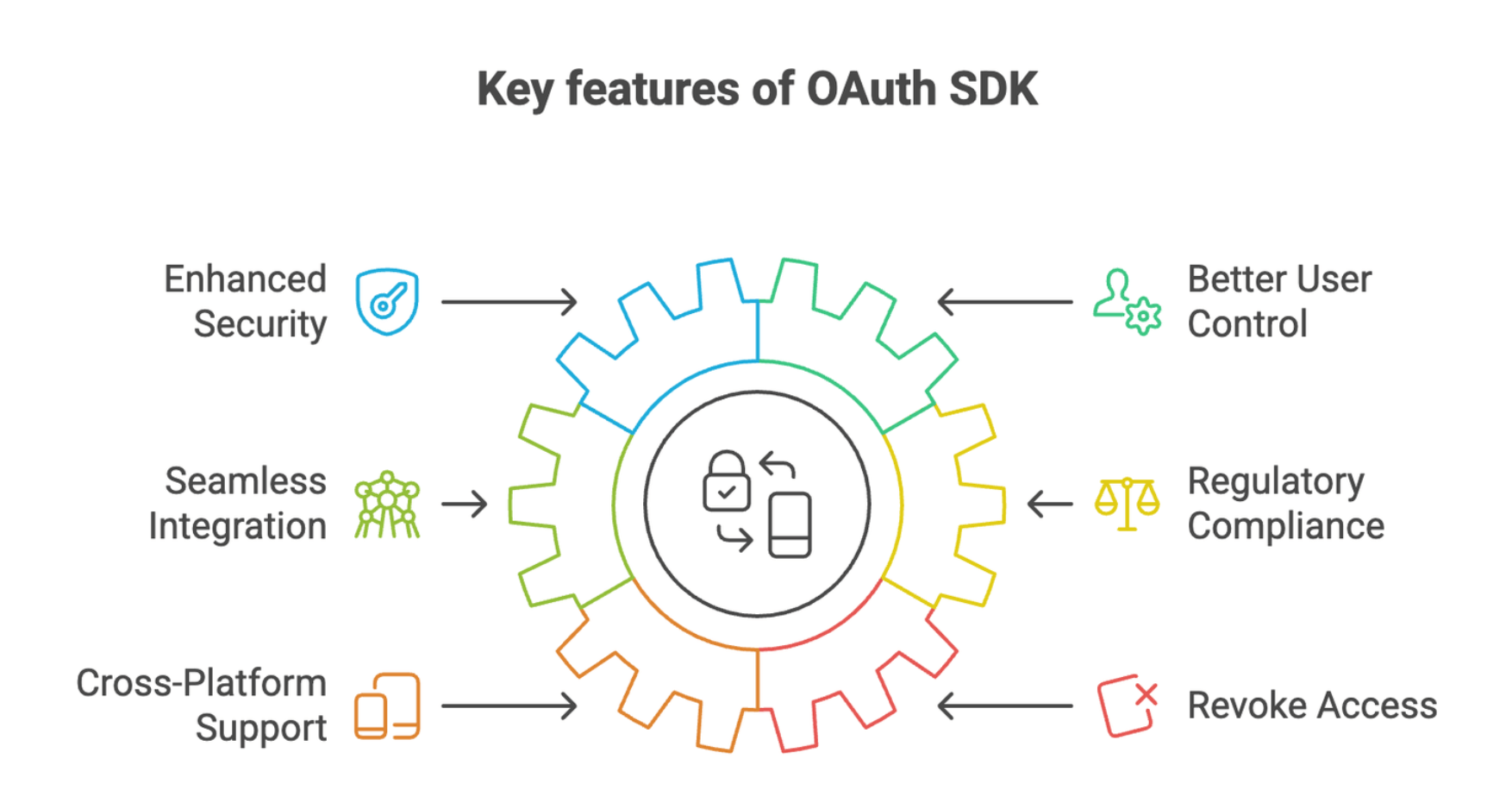
- Enhanced Security: OAuth’s token-based authentication minimizes risks associated with sharing sensitive credentials.
- Better User Control: Users can explicitly grant permissions, fostering trust and transparency.
- Seamless Integration: The SDK integrates effortlessly with existing systems and third-party APIs.
- Regulatory Compliance: The OAuth SDK adheres to global data protection standards, ensuring privacy and compliance.
- Cross-Platform Support: Can be designed to work across Android, iOS, and the web. For now, we only support Android.
- Revoke Access: Users will have control over their access token, and they can revoke it anytime from the Truecaller app, which implies the partner app can no longer fetch the user’s profile information.
Benefits of the OAuth SDK for Developers
- Customizable Workflows: Developers can tailor the authentication flow to suit specific app requirements.
- Scalability: Designed to handle a growing user base without compromising performance.
- Improved User Experience: Secure and transparent about what data gets shared with the app builds user trust and enhances engagement.
Comparing 1-tap Login SDK and OAuth SDK
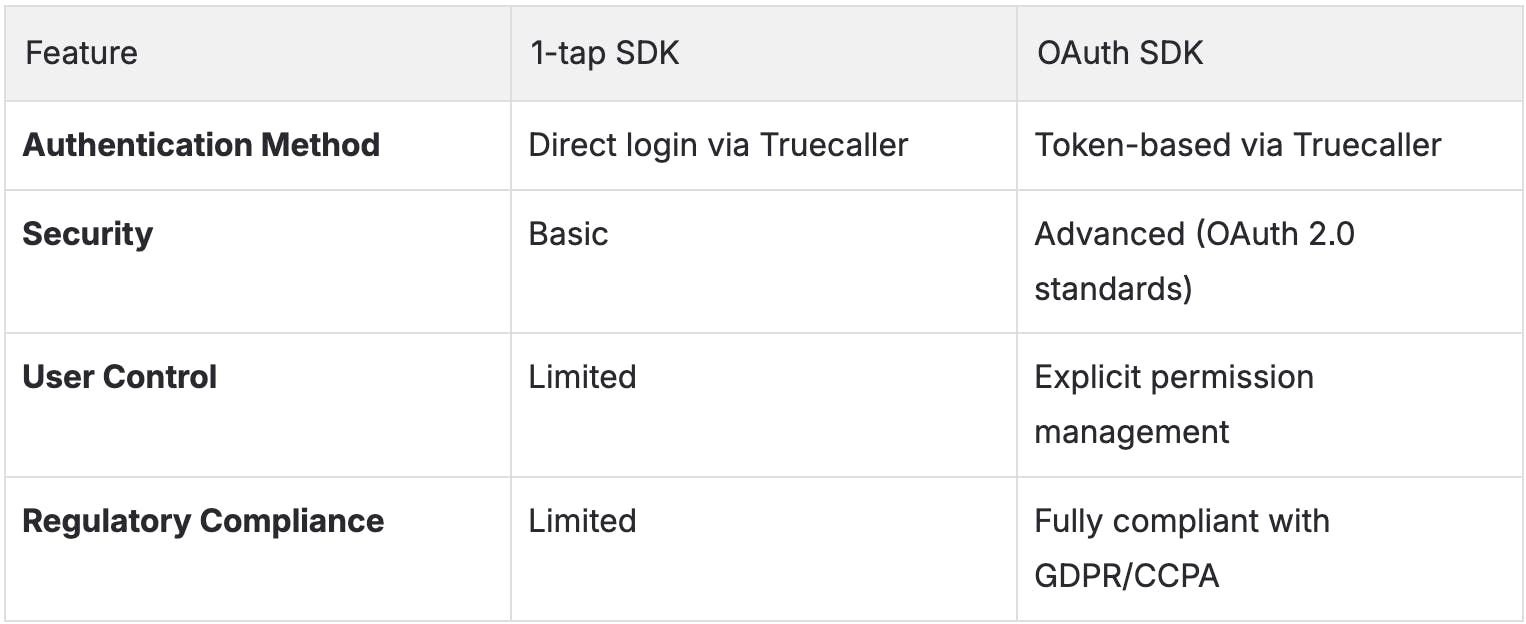
How it works
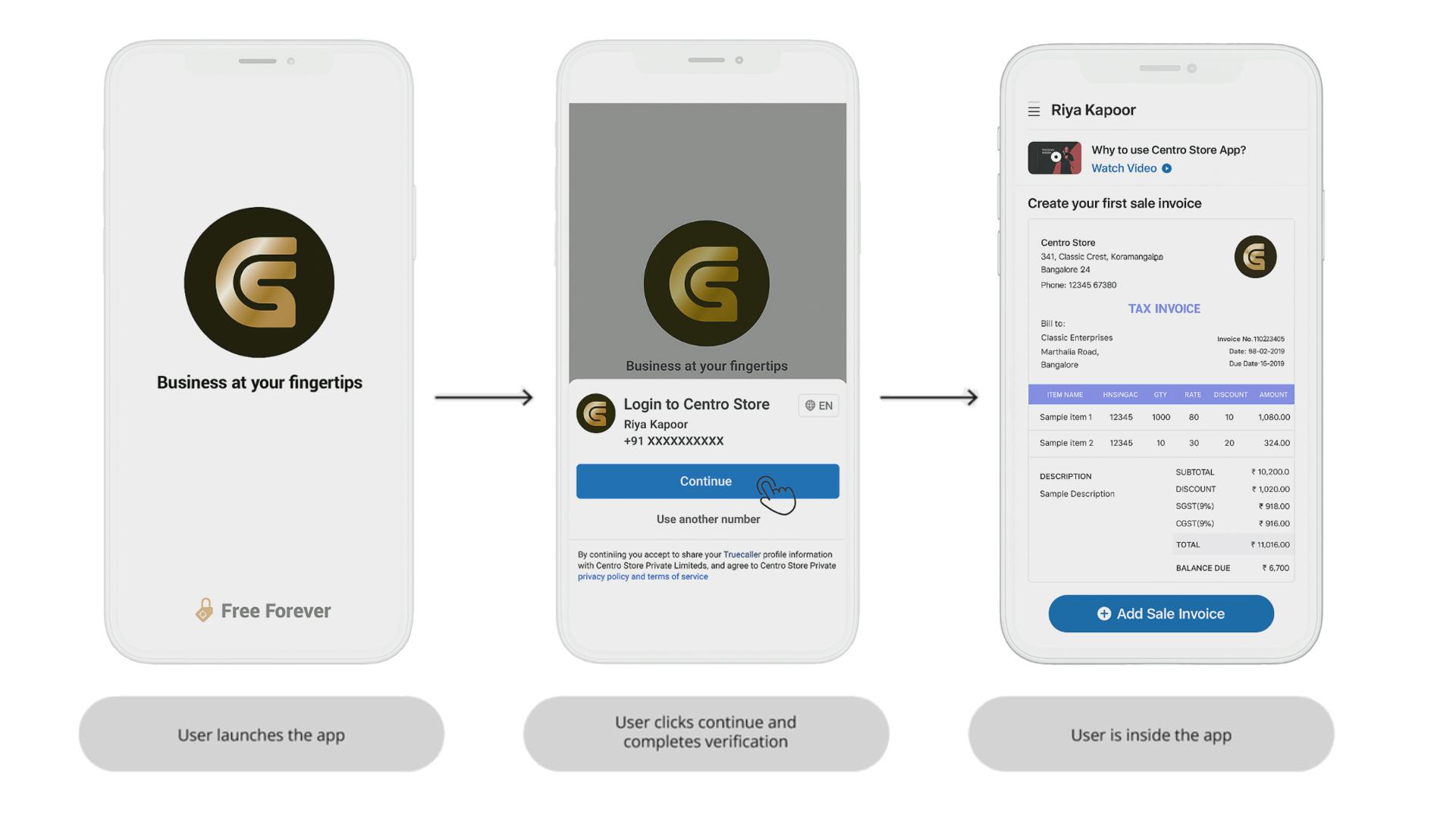
Truecaller OAuth SDK Flow
Although the flow looks quite similar to the 1-tap flow, the difference here is that, after user consent, the Truecaller OAuth SDK will share the user’s authorization code rather than sharing the user profile itself, which was the case in the 1-tap flow. Using this authorization code, the partner developer can get the user’s access token, and using the user’s access token, they can fetch the user’s profile, meaning they can reuse the access token up to a certain time to fetch the user’s latest profile information without repeatedly asking for their consent every time.
Improve Security with PKCE
Despite enhanced security, OAuth 2.0 public clients can still be susceptible to authorization code interception attacks. In this attack, the attacker intercepts the authorization code returned from the authorization endpoint within a communication path not protected by Transport Layer Security (TLS), such as inter-application communication within the client's operating system. Once the attacker has gained access to the authorization code, they can use it to obtain the access token, which can be further used to fetch the profile information of the user.
Proof Key for Code Exchange (PKCE, pronounced "pixy") is a technique that is used to mitigate such threats, and the Truecaller OAuth SDK comes integrated with this technique.
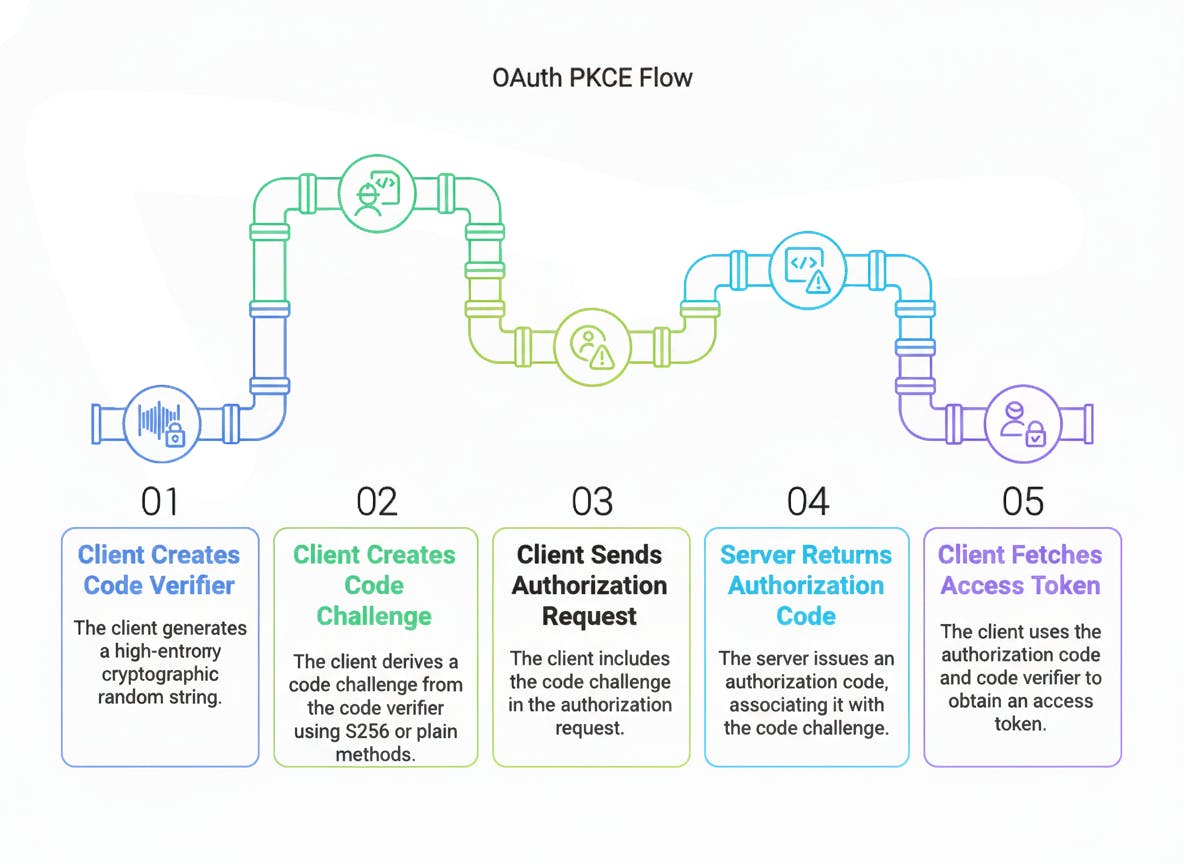
PKCE Flow
PKCE Integration in OAuth SDK
Truecaller OAuth SDK provides an inbuilt Utility class that provides methods to generate a high-entropy Code Verifier and its corresponding Code Challenge, making it easier for the partner developer to integrate this within their flow.
- Using the Utility class, they need to first generate a unique Code Verifier for each request & store it in their current app session since it would be required later to generate the access token. (Refer to step 5 in the above flow diagram)
- Using this Code Verifier, they can now fetch the associated Code Challenge using the same Utility class and then set it in the SDK using one of the SDK’s setter methods.
- After setting the Code Challenge, the SDK will take care of sending this Code Challenge in the authorization request to generate the Authorization Code.
- Once the consent is granted, the SDK will return the Authorization Code to the partner app. Using this Authorization Code and the Code Verifier generated in step 1, the partner developer can now fetch the Access Token.
How PKCE Mitigates Threats
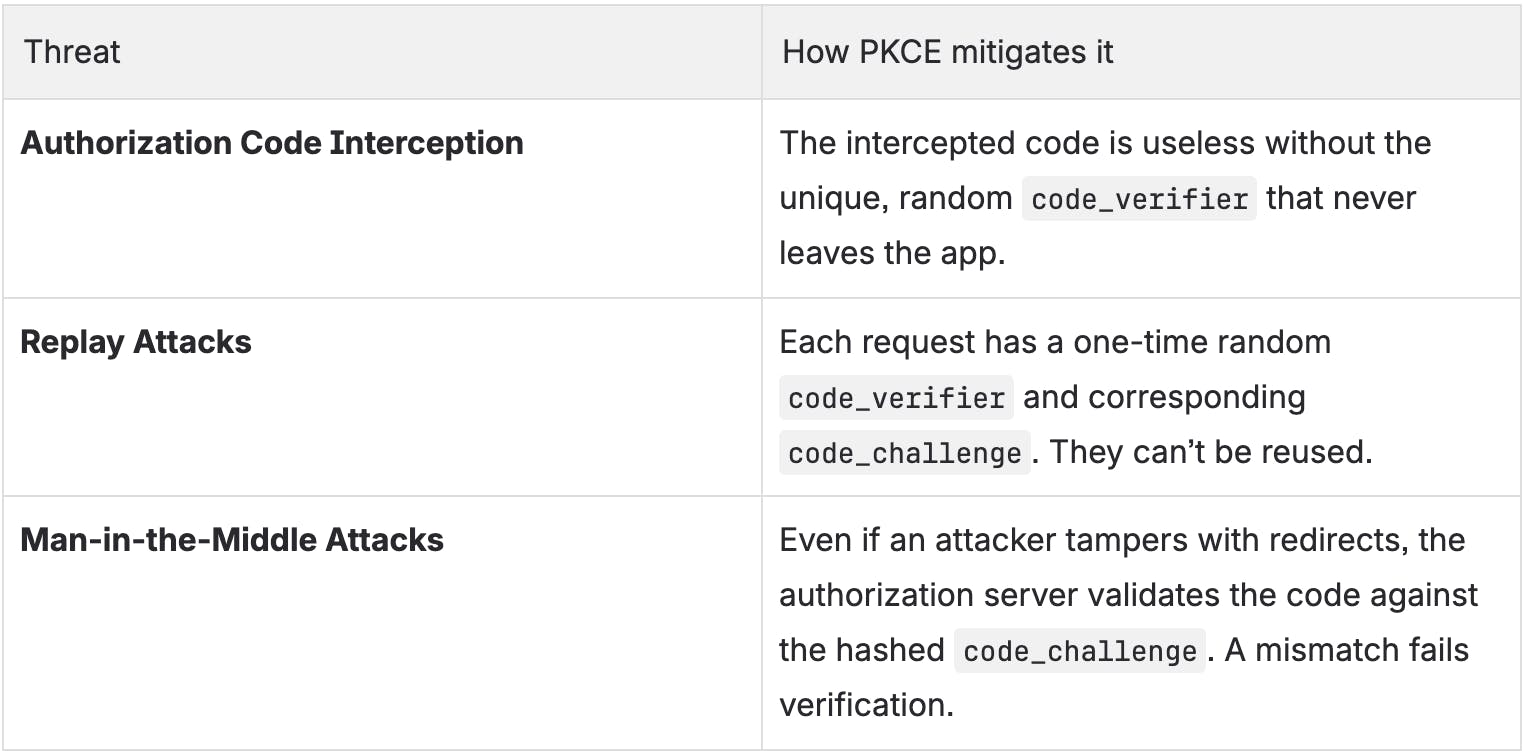
Example Implementation
Below is a simplified, end-to-end PKCE example in Kotlin using the Truecaller OAuth SDK and a sample token exchange.
Step 1: Generate the Code Verifier and Code Challenge
// Step 1: Generate a unique Code Verifier for this session
val codeVerifier = CodeVerifierUtil.generateRandomCodeVerifier()
// Step 2: Derive the Code Challenge from the Code Verifier
val codeChallenge = CodeVerifierUtil.getCodeChallenge(codeVerifier)
// Step 3: Set the Code Challenge in the Truecaller OAuth SDK
codeChallenge?.let {
    TcSdk.getInstance().setCodeChallenge(it)
}
Why this matters:
The codeVerifier stays only on the client device app - it’s never sent until the token exchange step. The codeChallenge is sent instead, which is a hashed, non-reversible version.
Step 2: Handle the Authorization Code after consent
After the user grants consent, Truecaller OAuth SDK returns an authorization code
override fun onSuccess(result: TcOAuthData) {
    val authorizationCode = result.authorizationCode
    if (authorizationCode != null) {
        fetchAccessToken(authorizationCode, codeVerifier)
    }
}
Step 3: Exchange Authorization Code + Code Verifier for Access Token
Now, your app securely exchanges both values with the backend or directly with Truecaller’s token endpoint. Sample cURL request:
curl --location --request POST 'https://oauth-account-noneu.truecaller.com/v1/token' \
--header 'Content-Type: application/x-www-form-urlencoded' \
--data-urlencode 'grant_type=authorization_code' \
--data-urlencode 'client_id=<<your-client-id>>' \
--data-urlencode 'code=<<authorization_code>>' \
--data-urlencode 'code_verifier=<<your-code-verifier>>'
Flutter Plugin
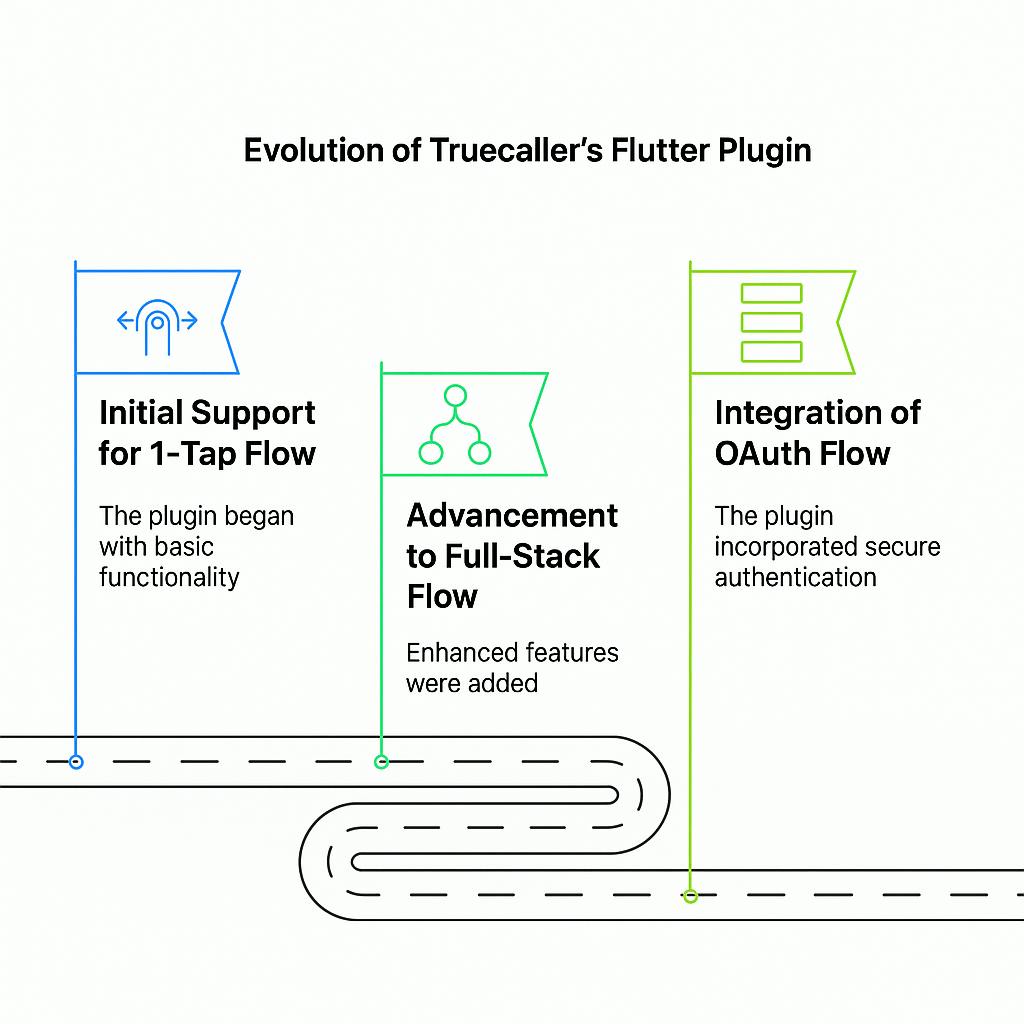
Truecaller’s Flutter Plugin has had a similar journey to the Truecaller SDK. It started with support for 1-tap flow, followed by Full-Stack flow, and finally, OAuth flow.
Initial Support for 1-tap Flow
The plugin initially focused on replicating the seamless experience of the native 1-tap SDK within Flutter applications. By leveraging Truecaller’s pre-verified profiles, developers could achieve:
- Instant user verification without requiring manual input.
- Reduced friction in onboarding flows, boosting successful sign-ups.
Advancements with Full-Stack Flow
As with the native Full-Stack SDK, the Flutter plugin added support for verifying both Truecaller and non-Truecaller users. This expanded its utility by enabling features such as:
- Manual verification via drop call or OTP for users without a Truecaller account or app.
- Versatility in handling edge cases, such as alternate number verifications or skipped consents.
- A unified solution for comprehensive user verification, eliminating the need for fallback mechanisms.
Integration of OAuth Flow
The most significant evolution came with the introduction of OAuth support in the Flutter plugin, with the intention of keeping our Flutter plugin always at parity with the native SDK. This addition aligned with modern authentication standards, leveraging the OAuth 2.0 protocol, and brought several benefits:
- Token-Based Authentication: Ensuring secure and scalable user authentication across platforms.
- Enhanced User Control: Users could grant or revoke permissions easily, fostering trust and transparency.
- Cross-Platform Compatibility: Truecaller’s OAuth flow within Flutter allowed developers to create apps that seamlessly worked across Android, iOS, and web ecosystems.
- Regulatory Compliance: Adherence to GDPR and other privacy standards ensured legal compliance and user trust.
What's Next?
The evolution of Truecaller’s SDK from the 1-tap Login to the OAuth SDK and its extensions, like the Flutter plugin, showcases a proactive approach to addressing the changing needs of developers and users. By embracing modern authentication standards and exploring future enhancements like MWeb flow and OAuth SDK++, Truecaller has positioned itself as a leader in providing secure and seamless login experiences.
Whether you are building a new app or scaling an enterprise app, Truecaller’s SDK offerings provide the tools you need to deliver exceptional user onboarding. Check out the following links to learn more about the Truecaller SDK and its offerings (latest offerings as of July 2025):
Shubhral Kumar
Jan 9, 20269 min read